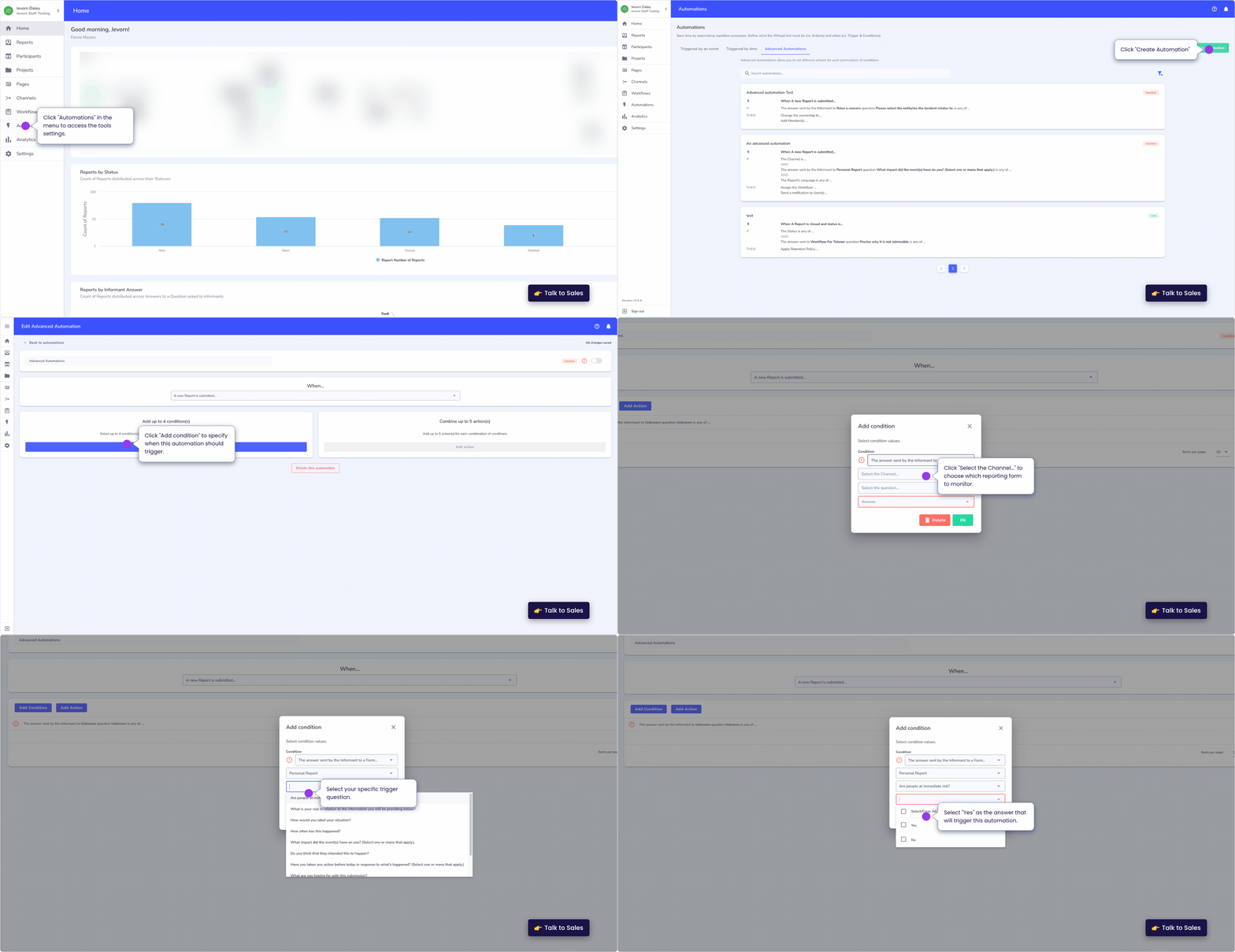
1. Define Multiple Triggers
Unlike simple automations, advanced rules can be activated by several different events.
-
Flexible Starting Points: You can set the automation to trigger when a report is first created, when it is updated, or even when a specific field (like "Case Status") is modified. This ensures the rule is active throughout the entire lifecycle of the case.
2. Layer Multiple Conditions (AND/OR Logic)
This is where the power of advanced automation lies. You can stack conditions to create a highly specific filter.
-
The "AND" Logic: All conditions must be met (e.g., Category is "Bribery" AND Location is "London").
-
The "OR" Logic: Any one of the conditions can be met (e.g., Category is "Theft" OR Category is "Vandalism").
-
Keyword Scanning: You can even set conditions to scan the report for specific keywords or names to identify high-priority issues or potential conflicts of interest immediately.
3. Map Multiple Actions
Once the conditions are met, you can trigger a chain of events. A single advanced automation can perform several tasks at once:
-
Assign the case to a specific investigator.
-
Add a specific tag like "High Risk."
-
Notify the legal team via email.
-
Post a specialized acknowledgment message to the informant's Safe Inbox.
Whispli | How can I set up an advanced automation?