
User Groups are a powerful way to manage permissions at scale. Instead of assigning reports to individuals one by one, you can group team members together—such as a "Legal Team," "HR Brazil," or "Internal Audit"—and assign cases to the entire group at once.
1. Where to find Group Settings
Because User Groups define the security and visibility of sensitive data, creating them is a restricted administrative task.
-
Access Level: This option is only available to Admins or Configurators.
-
Location: You can find these settings by navigating to the Settings area of the platform and selecting the User Groups tab.
2. How Access Works for Groups
The most important thing to understand about User Groups is how they handle report visibility:
-
Collective Access: Any user added to a group will automatically have access to all the reports that the group is assigned to.
-
Streamlined Triage: When a new report comes in, you don't have to guess which person is available; you simply assign it to the group. Every member of that group will be notified and can collaborate on the case.
-
Consistency: If a new employee joins the "Compliance Team," you simply add them to the "Compliance User Group," and they instantly gain access to the relevant history and active cases they need to see.
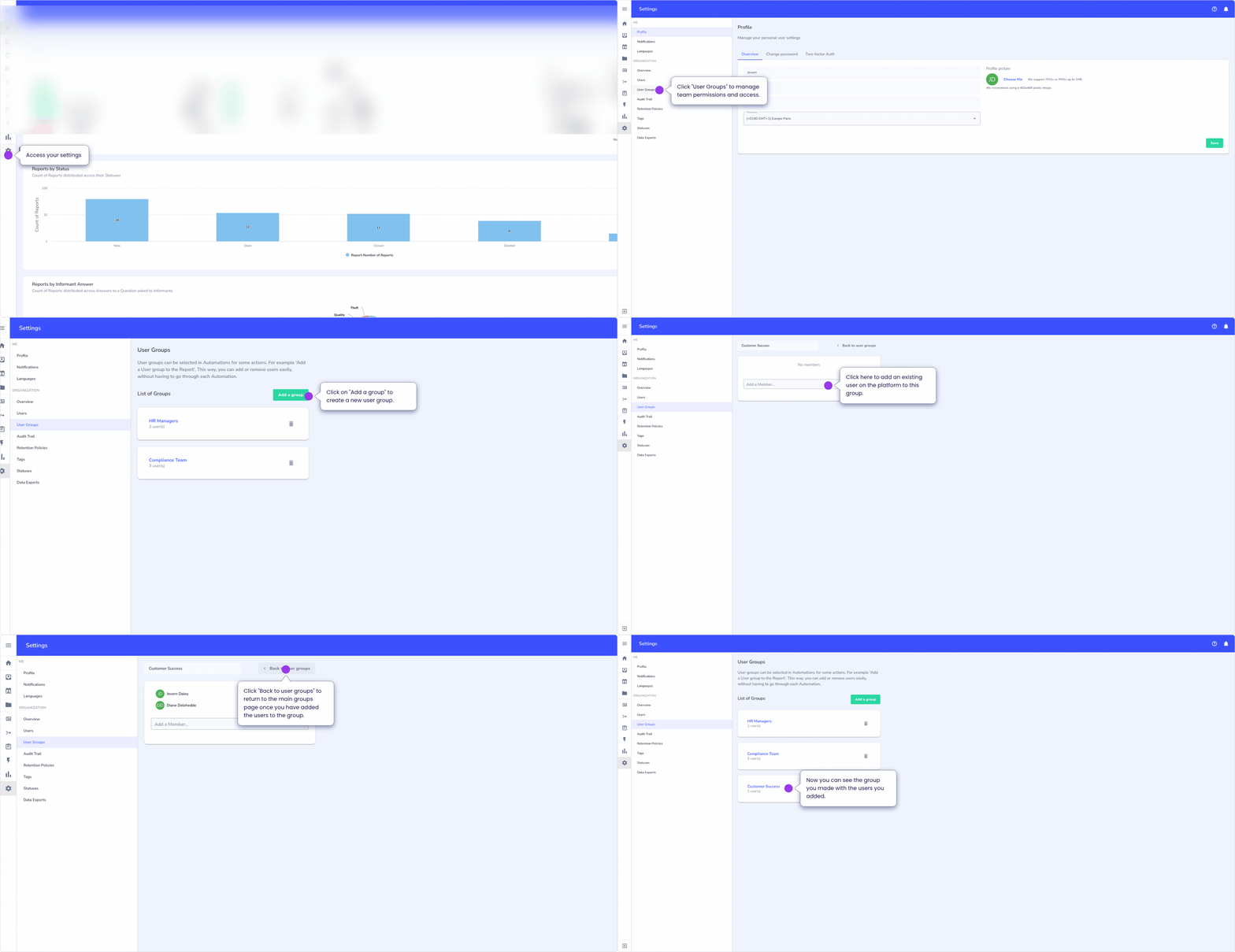
3. Steps to Create a Group
-
Navigate to Settings: Click on the cog icon or "Settings" menu.
-
Select User Groups: Click "Create New Group."
-
Name the Group: Give it a clear, functional name (e.g., IT Security Response).
-
Add Members: Select the individual users you want to include in this group from your existing user list.
-
Save: Once saved, this group will now appear as an option in your Automations and Manual Assignment menus.
Whispli | How can I create a user group?
Why use User Groups?
Using groups is a best practice for business continuity. If an individual Case Manager goes on leave, the rest of the members in their group can still see and manage the reports, ensuring that no whistleblower is left waiting for a response.