
Unlike traditional snooze functions found in other platforms, Whispli's Snooze acts more as a reminder rather than a way to mute notifications. This feature is particularly useful for users handling a large volume of reports, ensuring that no case is forgotten while still receiving all relevant notifications.
How the Snooze Feature Works
1. Access the Snooze Option
Navigate to the specific report or case you wish to snooze.
Within the case details view, you will find the Snooze button:
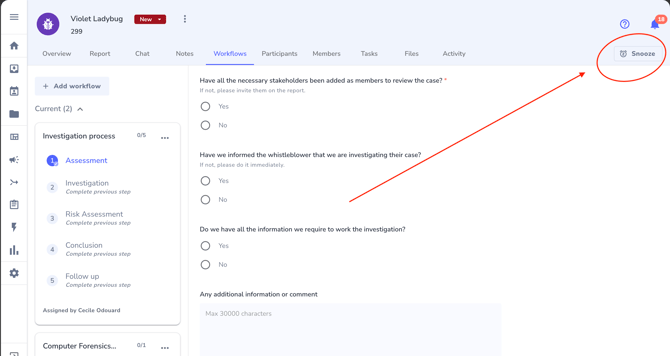
2. Select a Snooze Duration
After clicking the Snooze button, a dropdown menu will appear, presenting you with
several options for how long you’d like to snooze the report.
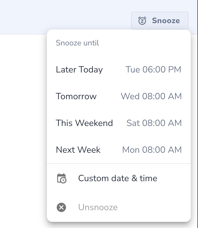
The options include:
-
Snooze until Later Today: postpones the report until later on the same day.
-
Snooze until Tomorrow: postpones the report until the next day.
-
Snooze until the Weekend: postpones the report until the next Saturday.
-
Snooze until Next Week: pushes the reminder to the same day the following
week. -
Custom Date: allows you to select a specific date and time for the reminder, giving
you complete control over when the report should reappear in your workflow.
3. Confirmation and Notification
Once you’ve selected your preferred snooze duration, the system will confirm the action and
automatically schedule a reminder. When the snooze period ends, you will receive a
notification within the Whispli platform and, optionally, an email alert. This ensures you are
prompted to revisit the report at the appropriate time.
Key Benefits
-
Effective Workload Management: The Snooze feature helps users focus on urgent tasks by allowing them to defer non-urgent reports. It also ensures that users are reminded about these reports at a later time without missing any important updates.
-
Reminders with Active Notifications: When a report is snoozed within the Whispli platform, users continue to receive all notifications related to that report, such as messages from informants, status changes, or mentions in notes. This ensures that even while a report is temporarily set aside, important developments are not missed.
-
Flexible Case Management: The Snooze feature allows users to set reminders based on their personal needs. Users can snooze a report until a custom time, for example, for one week while they are on leave that week, or for X days so that they are reminded before a retention policy gets applied to a particular archived report. This flexibility makes it easier to manage high volumes of reports.
-
Personalised at user level: The snooze setting is applied at the user level, meaning each team member can individually decide when to be reminded about a specific report. This personalises the investigation process and helps users manage their time more efficiently.
Advanced Usage Tips
1. Strategic Snoozing
Use the Snooze feature as part of your broader time management strategy. For instance, you might choose to snooze reports that require input from others or additional data, revisiting them once all necessary information is available.
The snooze feature is particularly useful when dealing with reports that have an archival
retention period. For example, if a report is archived with a retention period of two years, you
can set a snooze reminder to review it before the retention period ends. This ensures
that the report is still relevant and helps you decide whether to unarchive or move forward with the deletion of the report.
2. Snooze for Regular Reviews
Consider snoozing certain reports as part of a regular review cycle (e.g., weekly or monthly reviews). This can be particularly useful for ongoing reports that require periodic check-ins but not constant monitoring.
3. Notification Management
If you prefer not to receive email notifications, you can manage your notification preferences within your account settings, ensuring that reminders are delivered through the platform.